
What is OXR?
OXR (Optical Everything Recognition) is a document parsing model from SoMark with 1.3 billion parameters. Its source code and model weights are publicly available. It converts PDFs and document images into Markdown in reading order and JSON with layout coordinates. Use Markdown to index document content and JSON to locate the original text, tables, and formulas on the page.GitHub repository
View the README, source code, and parsing examples.
OXR-1.0 model
Download the BF16 model and bundled lightweight layout model.
Ways to use OXR
- Online demo. Upload a PDF or image and compare the Markdown and layout boxes with the original page. Open the online demo
- Free API. Submit files through the HTTP API, CLI, or SDK. View the integration guide
- Self-hosting. Run the model on your own NVIDIA GPU server and submit files through the local web demo, HTTP API, or SoMark CLI. View the self-hosting steps
What OXR can parse
OXR defines 13 layout element types, including titles, body text, page headers and footers, footnotes, captions, figures, tables, math formulas, chemical equations, chemical structures, code blocks, and stamps. The default output filters out page headers and footers. Full element and format listOXR Free API
The OXR Free API hosts the open-source OXR model. Upload a PDF or image to try it without signing up or requesting an API key.Connection settings
Endpoints
Sync parsing returns the result in the same request. Async parsing returns atask_id first. Use it to query progress and retrieve the result.
Use the CLI or SDK
With the SoMark CLI or SDK, set the base URL to the address above. For the CLI, you can set--api-key to dummy.
Self-hosting
After deploying OXR on your own server, submit documents through the local web demo, HTTP API, or SoMark CLI.Prepare your deployment environment
Use a Linux host with an NVIDIA GPU that supports BF16, a CUDA 13.0-compatible driver, and Docker configured for--gpus all. The project recommends 24 GB on one GPU for low-concurrency testing and at least 48 GB on one GPU for long documents or higher concurrency. Use Python 3.12 to install the model download tool. Deployment requirements and FAQ
Download the models and start the service
Clone the OXR repository and download the completeOXR-1.0 model directory. It includes the recognition model and the layout weights under layout_analysis/.
http://localhost:8000/demo to try parsing, or http://localhost:8000/docs to inspect the API. This command binds the port to the host’s loopback address.
Call your self-hosted parsing API
Putdocument.pdf in your terminal’s current directory and send a sync parsing request to the local service. The two output_formats fields request Markdown and JSON.
code: 0, read Markdown from data.result.outputs.markdown and layout JSON from data.result.outputs.json.
To save the output directly to files, use the SoMark CLI. Set the Base URL to the local service’s /v1 and use md,json to select the output formats.
bbox coordinates in JSON to locate regions on the original page. Check which OXR endpoints and parameters are available when integrating with your application. SoMark and OXR integration differences
Run from source
To deploy the recognition and layout models separately, start both model services and enter their addresses in the document parsing service’s configuration. Official source deployment stepsPublic benchmarks
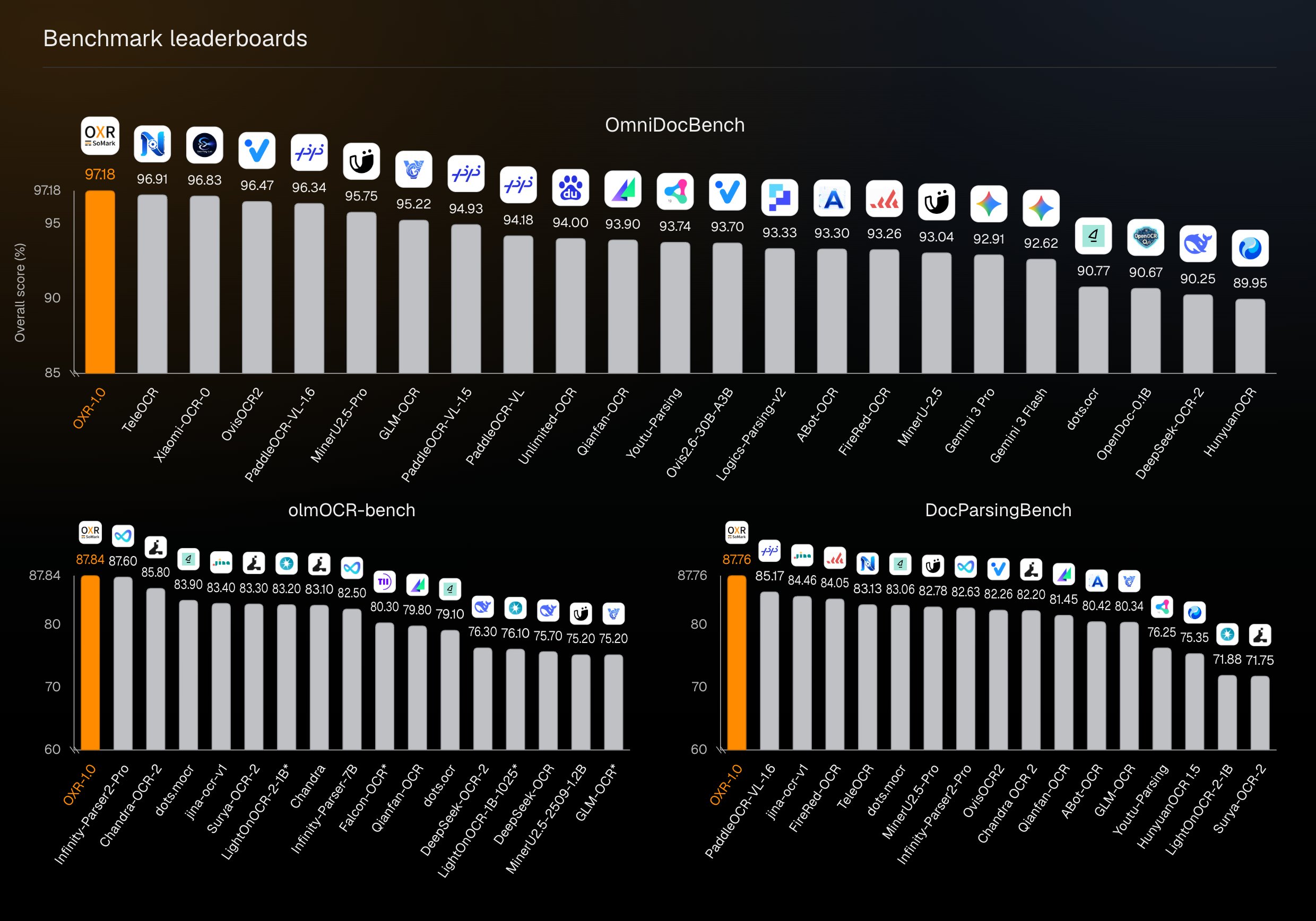
OmniDocBench, 87.84 on olmOCR-bench, and 87.76 on DocParsingBench, ranking first among the models shown in each comparison. SoMark leaderboards
The project also ran a fixed 100-page OmniDocBench sample on one 96 GB NVIDIA RTX PRO 6000 Blackwell GPU. OXR processed about 0.99 pages per second end to end, including layout analysis, recognition, and reading order. Benchmark conditions and full results
OXR uses the OXR License, which is based on Apache 2.0 and includes additional commercial licensing and attribution terms. Full license